Online / Multiplayer / Streaming
MECCHA CHAMELEON Online Guide: Hosting, Private Rooms, and Streaming with Viewers
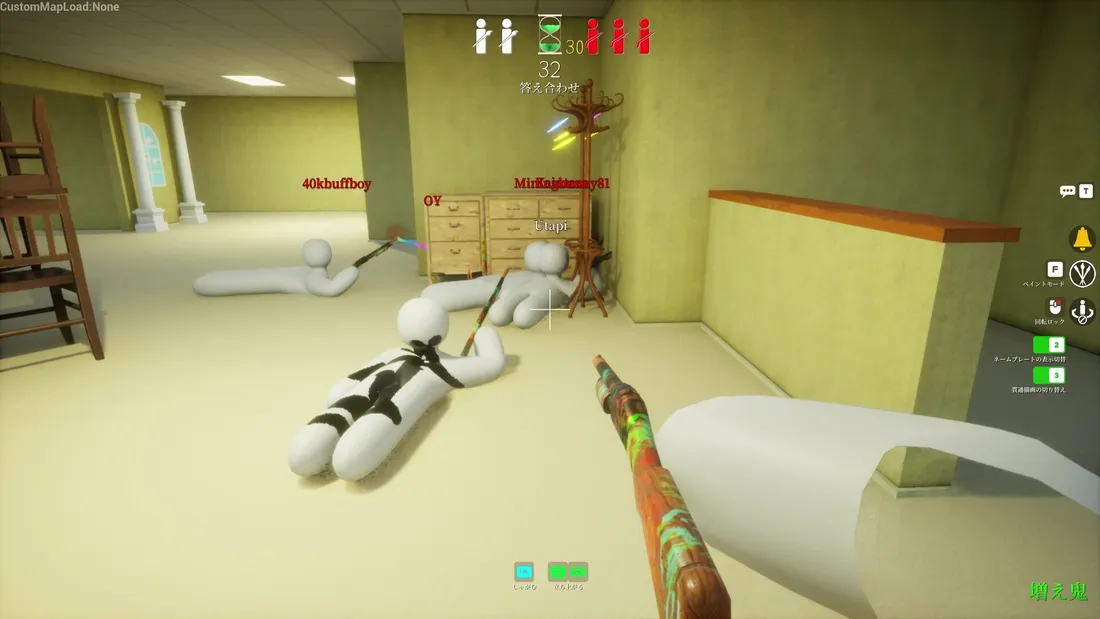
MECCHA CHAMELEON (originally MECCHA CHAMELEON / めっちゃカメレオン) is a strictly online multiplayer hide-and-seek game. There is no single-player mode; all the fun comes from playing with real people. This page covers the essentials of online play: how to create a room, how to invite friends to private matches, the optimal player count, why there is no cross-platform play, and why the developers designed it to be a "streaming-first" game. Whether you want to host a private match for friends or run a viewer-participation stream, this MECCHA CHAMELEON online guide will get you started.
On This Page
- Connection Model: Player-Hosted, No Dedicated Servers
- Playing with Friends: Four Steps to Hosting and Inviting
- What is the Optimal Player Count? Recommended vs. Maximum
- No Cross-Platform, No Single-Player
- Built for Streaming: Viewer Participation and Recording Policies
- Avoiding Pitfalls: Debunking Workshop and "Dedicated Router" Rumors
- Cannot Connect or Find Rooms? Common Troubleshooting Checklist
- Frequently Asked Questions
Connection Model: Player-Hosted, No Dedicated Servers
First, let's clarify a fundamental point: MECCHA CHAMELEON does not have official dedicated servers, nor does it have a traditional automatic matchmaking lobby. Online play uses a player-hosted model, where one player "creates a room" and others join. In other words, the room is hosted by a player's computer, not by the developer's infrastructure.
Rooms have two states, distinguished only by a "Private" toggle:
- Public (Not Private): As the official description states, "If you create a server that is not set to private, anyone can join freely." This is ideal for quickly filling a lobby without being picky about teammates.
- Private (Friends-Only): By setting the room to private, it becomes a closed session accessible only to those you invite. Use this for playing with friends or streaming with viewers.
Because the room is hosted by the player, network quality depends heavily on the host's upload bandwidth and connection stability. This is why the player cap may fluctuate based on the host's network, and why lag is often caused by the host rather than your own connection. When creating a room, try to have the person with the best and most stable connection act as the host for a much smoother experience. To learn how a match works and what modes are available, check out the Gameplay page.
Playing with Friends: Four Steps to Hosting and Inviting
This is the part most players care about. The standard process for playing MECCHA CHAMELEON with friends is quite simple:
- Host a Room: Create a room (server) in the lobby.
- Set to Private: Toggle the private setting to block strangers and keep it as a friends-only session.
- Select Map, Mode, and Capacity: The host chooses the map (e.g., Hide-and-Seek Mansion, Penguin Hotel) and the game mode (Normal, Infection, etc.), and sets the player limit. See Maps & Environments for details.
- Invite Friends: As of version v1.2.1 (6/14), the game includes an invite feature, allowing you to invite friends directly. Earlier versions did not have one-click invites.
Regarding how to join private rooms, players have reported that in earlier versions, you had to manually search by "Region + Room Name + Password + Tags." This is a community-driven method, as the developers have not provided a formal description of the joining process, so sharing the room name and password with your teammates is usually the way to go.
Two hard requirements must be met, or friends will be unable to "find your room":
- Everyone must own a copy of the game: It is a buy-to-play title; there is no "one copy for the whole group" feature.
- Everyone must be on the same game version: The developers release patches frequently, and version numbers update rapidly. Version mismatch is the #1 reason for "cannot find room / cannot join" issues. Ensuring everyone is on the latest version is the first step to a hassle-free session.
What is the Optimal Player Count? Recommended vs. Maximum
"How many players can play?" is a point of conflicting information. We have listed the sources below without drawing a definitive conclusion for the developers. There are currently three different claims regarding MECCHA CHAMELEON:
| Source | Recommended / Max Players |
|---|---|
| Official Steam Store Page (Matches Famitsu) | Recommended 2-10, 11+ depends on host network |
| English Community Wiki | 2-12 players |
| AUTOMATON Launch Report | Recommended 2-14, up to 24 |
Only the first row reflects the official Steam store page, which is the most reliable reference. The 2-12 figure comes from the English community wiki, and the 24-player claim comes from an AUTOMATON launch report. Why the discrepancy? Because the game is player-hosted, the actual hard cap is not fixed and fluctuates based on the host's bandwidth. The developers have not yet announced a definitive maximum. Therefore, treat numbers like "up to 24" as media or community estimates, not official guarantees.
Setting aside theoretical limits, according to community players, 4 to 8 players is the "sweet spot" for balance: too few (2-3) and the Seeker clears the map too quickly, leaving the Hider no room to breathe; too many and the room becomes prone to lag, and finding players becomes like finding a needle in a haystack. You can further refine this by mode:
- 2-4 Players: Better for "Normal" single-Seeker mode for a crisp, fast-paced experience.
- 6-10 Players: Better for "Infection" mode, where caught players become Seekers, creating a snowball effect that requires more players to be chaotic and fun.
For Seeker strategies in Infection and other modes, refer to the Seeker Guide.
No Cross-Platform, No Single-Player
Two frequently asked questions with straightforward answers.
Regarding Cross-Platform Play: MECCHA CHAMELEON does not support cross-platform play for the simple reason that it is currently a PC/Steam exclusive on Windows. There is no second platform to "cross" with. Everyone is running the same Windows build, so there is no PC-to-console interoperability. If you see "PS5 cross-platform" claims on some sites, they are unfounded; console versions have not even been announced. See System Requirements & Pricing for details.
Regarding Single-Player / Offline: This is a strictly online PvP game with no single-player mode, no AI bots, and no offline play. You must have real teammates and an internet connection to start a match, and rooms are hosted by players rather than dedicated matchmaking servers. Several media reviews have cited the "lack of single-player" as a drawback, so keep this in mind if you don't have friends to play with and don't want to join public rooms with strangers.
It supports Steam Family Sharing, but because the game requires everyone to be online with their own copy, you generally cannot use one copy to have two people playing simultaneously. The expectation of "one copy for the whole family to play together" is not realistic.
Built for Streaming: Viewer Participation and Recording Policies
This is one of the key mechanisms that allowed MECCHA CHAMELEON to sell 2,000,000 copies in just a few days and go viral—a design intent explicitly mentioned by the developers.
Viewer-Participation Streaming: The developers have stated that streamers can easily host "viewer-participation" matches, allowing their audience to join in with a single click. Combined with the private room mechanism mentioned earlier, a streamer can open a private room, share the name and password on their stream, and viewers can jump in to play hide-and-seek. This "streamer and fan in the same frame" gameplay is naturally suited for platforms like Twitch and YouTube, and is the core engine behind the snowballing popularity of MECCHA CHAMELEON.
Loose Recording/Streaming Policy: The developers have only one requirement for content creators: include the game name in the title (including a Steam store link is optional, not mandatory). This means both casual players and streamers can record, clip, and create guides with a very low barrier to entry. This friendly policy has further amplified the game's exposure.
Proximity Voice Chat + 12 Languages: Version 1.1.0 added proximity voice chat, where nearby players can hear you and distant ones cannot. This is a huge plus for viewer-participation matches, allowing for banter while playing and enabling Seekers to locate Hiders by sound, adding interaction and tension. The interface and subtitles support 12 languages, making it easier to play across regions, but to reiterate: multi-language support is for the interface only and does not imply cross-platform play. See the System Requirements page regarding the "Full Audio" tag and whether it actually features full voice acting.
Avoiding Pitfalls: Debunking Workshop and "Dedicated Router" Rumors
The popularity of MECCHA CHAMELEON has spawned a wave of SEO content farms and AI-generated guide sites that present things never mentioned by the developers as fact. As a player, keep an eye out for these two myths:
- "Supports Steam Workshop / Official MOD Tools" - No official basis: Several guide sites (e.g., slashskill, allthings.how, deltiasgaming, and some fan wikis) claim the game integrates with Steam Workshop. However, the term "Steam Workshop" has never appeared on the official Steam page or patch notes. This should be considered unverified or potentially fabricated.
- "Recommended to buy a specific router (e.g., MSI Radix)" - Likely affiliate-driven fabrication: These hardware recommendations have no official connection to the game. The developers have never stated that the game requires a specific router. Since it is player-hosted, a standard, stable connection is sufficient; there is no need to buy dedicated hardware for it.
A crucial distinction to make here: The developers do provide an in-game "Map Editor Tool", which was available at launch, and v1.2.0 implemented "joining mods without restarting the server," so custom maps are real. The issue is that "in-game map tools" and "Steam Workshop integration" are two different things. The former is official; the latter is not. When you see claims about "Workshop map subscriptions," understand that the community is conflating the two. For more info on custom maps, see Maps & Environments.
Cannot Connect or Find Rooms? Common Troubleshooting Checklist
The benefit of player-hosted rooms is fast match starts; the cost is the occasional "cannot find room / cannot join / lag." Based on official mechanics and community player experience, following this order usually resolves most issues:
- Check Versions: Ensure the entire team is updated to the same latest version. Version mismatch is the most common reason for not finding rooms. Developers update frequently, so it's easy for someone to fall behind.
- Confirm Private Settings and Room Info: Private rooms require the room name, password, etc., to join. According to community players, double-checking this information character-by-character (including case sensitivity and region settings) often solves the issue.
- Switch to the Host with the Best Connection: Since the room is hosted by the player, lag and capacity depend on the host's connection. If it's lagging, have the person with the most stable bandwidth restart the room.
- Use the Invite Feature: As of v1.2.1, there is an invite feature. Use it to invite players directly instead of having them search manually, saving the hassle of matching parameters.
- Don't Overcrowd the Room: Rooms are more prone to issues when approaching the limit (especially when aiming for the "up to 24" claim). Dropping back to the 4-8 player "sweet spot" is usually more stable.
Please note that the developers have not yet released a comprehensive online troubleshooting document; the above is a compilation of general experience and confirmed mechanics. Always refer to in-game prompts for the most accurate info. For more beginner questions, check the FAQ. To learn about the game's background and developers, see About the Game, or visit the Official Steam Store Page.
Frequently Asked Questions
Can I play MECCHA CHAMELEON in a private room with friends?
Does this game support cross-platform play?
What is the optimal player count? What is the maximum?
Can I play single-player or with AI bots?
Updated on 2026-06-16